Sharing a rider: link, Tech Hub and privacy
Who can see your riders, and how to create a link, choose what it shows, hide it from the Tech Hub or remove it.
Your riders are private: only you can see them in your account. Nobody else can see a rider until you create a link to it.
Creating a link
- Save the rider. You need an account to share it.
- Press SHARE in the top bar and then Generate Link.
The link is public and the rider is visible in the Tech Hub. If you need to, you can hide it from the Tech Hub.
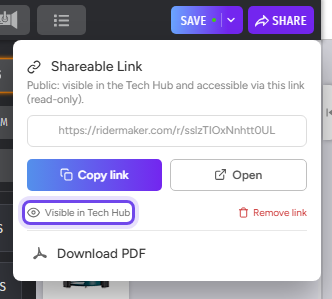
Use Copy link to send it, or Open to see it as others will, in read-only mode. The link always shows the last saved version of the rider: when you save changes, whoever has it sees them without you sending it again.
What the link shows
The link shows the stage and the channel lists in read-only mode, and whoever opens it can download the PDF. The text in the Details tab is not shown unless you turn it on. To turn it on:
- Open the channel list (the list icon in the toolbar) and switch to the Details tab.
- Turn on the Details text hidden in the rider link switch. It changes to Details text visible in the rider link.
- Save the rider.
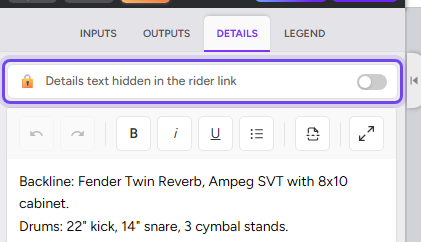
Before turning it on, check that the text does not contain personal information you don't want to share, such as phone numbers or emails. Your PDF always includes the details: the switch only changes whether they are shown in the link and in the PDF downloaded from it.
Hiding the rider from the Tech Hub
In the SHARE menu, press Visible in Tech Hub. It changes to Hidden in Tech Hub and the rider no longer appears in the Tech Hub or on your public profile. Press it again to make it visible. If none of your riders is visible, your public profile is not shown either.
Important: when you hide a rider from the Tech Hub, only people with the exact URL can see it. But the link is still published on the internet and doesn't ask for an account or password: if someone forwards the URL, whoever receives it can also see the rider. Share the URL only with the people you want to see it. If you don't want anyone else to see it, remove the link.
On the free plan a hidden link expires after 30 days; visible links don't expire. Once it has expired you can generate a new link, and the old one stops working, or go Pro/Premium and the same link works again. Pro/Premium links never expire.
Removing the link
In the SHARE menu, press Remove link and confirm. The link stops working for everyone who had it and the rider disappears from the Tech Hub. The rider itself is not deleted: it stays in your account.
If you generate a link again later, it will be a new address, and it is created visible in the Tech Hub.