Ridermaker Help Center

Rotating an item more precisely

How to rotate stage items in finer steps and how to return to the usual positions.

When you click an item its buttons appear, and the arrows turn it 22.5° per click. If you need finer rotation, hold CTRL (Cmd on a Mac) and click the arrows: each click turns it 5°.
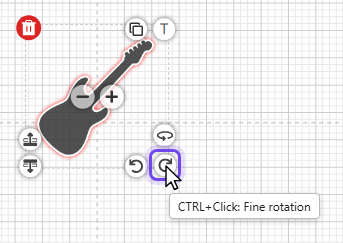
An electric guitar with its buttons and the pointer over the rotate arrow, which reads "CTRL+Click: Fine rotation"

A normal click, without CTRL, takes the item back to the original rotation positions.

Will you help us improve Ridermaker?

We use our own and third-party cookies (Google and Meta) to understand how Ridermaker is used and to measure and improve our ads on Facebook and Instagram. For the ads, Meta receives the Ridermaker pages you visit and, if you sign up or start a trial or a subscription, a notice from our server (with your encrypted email only for the trial or the subscription).

This tells us what to improve and helps us reach more technicians like you. You can change your mind at any time. More information in our Privacy and Cookies Policy.